In a nutshell: Add child support from New Child Support Deduction on the employee's Deductions tab. Use Protected Earnings to set the amount of pay that deductions must leave for the employee.
Applies to: Australia
About
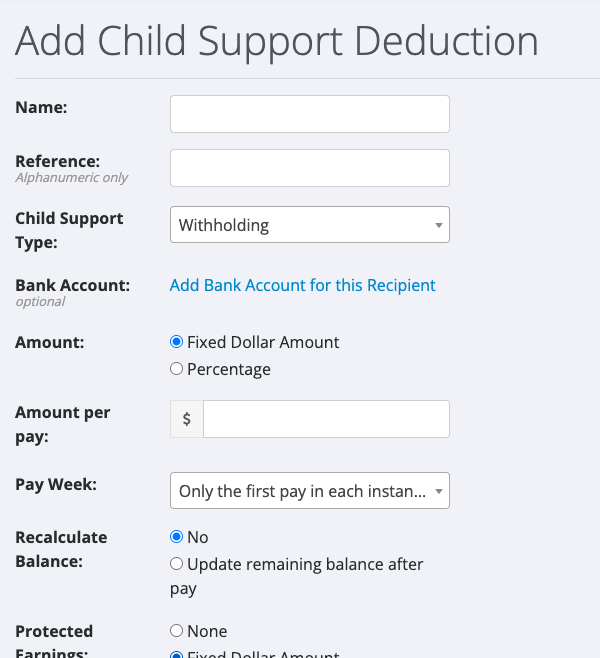
Child support is set up with its own form, which asks for a Child Support Type in place of a GL account code. The types are Withholding and Garnishee.
Protected Earnings is the part of an employee's pay that deductions are not allowed to reduce. You can set it as a fixed dollar amount or as a percentage of pay. It can be set on any deduction, not only child support.
Quick Reference
| Field | What it does |
|---|---|
| Child Support Type | Withholding or Garnishee |
| Bank Account | Optional. The recipient's account for the deducted money |
| Amount | Fixed Dollar Amount or Percentage |
| Amount per pay | The dollar amount taken from each pay |
| Pay Week | Which pays the deduction is taken from |
| Recalculate Balance | Whether the deduction keeps a remaining balance |
| Protected Earnings | None, Fixed Dollar Amount or Percentage |
| Effective Date and End Date | Optional. When the deduction starts and stops |
| Order | The order this deduction is taken in |
Add a child support deduction
- Go to Employees > Search and open the employee.
- Click the Deductions tab, then New Child Support Deduction. The Add Child Support Deduction screen opens.
- Enter a Name.
- Choose the Child Support Type: Withholding or Garnishee.
- Under Amount, choose Fixed Dollar Amount and enter the Amount per pay, or choose Percentage.
- Choose the Pay Week.
- Set Protected Earnings if the notice you received gives a protected amount. See the next section.
- Click Save Deduction.
Set protected earnings
- On the deduction form, find Protected Earnings.
- Choose Fixed Dollar Amount or Percentage. A second Protected Earnings field appears.
- Enter the dollar amount or the percentage.
- Click Save Deduction.
When an employee has protected earnings set on any deduction, the Deductions tab shows this notice: "At least one of this employee's current deductions has protected earnings set. The highest protected earnings amount (percentage of pay or fixed dollar amount) calculated will be applied to all deductions for this employee".
In other words, protected earnings set on one deduction protect the employee's pay from all of their deductions, and if several deductions have protected earnings the highest amount is used.
Good to know
- Protected earnings cannot be set on an addition.
- For other deductions, including spreading a total over several pay runs, see Deductions.
If you are unsure of the amounts
The amounts for child support come from the notice sent to you as the employer. If the notice is unclear, check with the agency that issued it before saving the deduction. For help with the PinvoiceR screens, raise a support ticket.