In a nutshell: To pay salaried staff, go to Pay Employee, use OR, Select Permanent Pay Run, tick the employees and click Pay Selected Employees. The pays then appear in Payroll > Open Batches, where you process them like any other batch.
Applies to: Australia and New Zealand
About
A permanent pay run creates the pay for each salaried employee from their salary and Daily Average Hours. It does not process the pay. It adds the pays to Open Batches, and from there the steps are the same as any pay run.
Before you start, each employee needs a salary and daily hours. See Setting a Salary for a Permanent Employee.
Quick Reference
| Part of the screen | What it shows | When to use it |
|---|---|---|
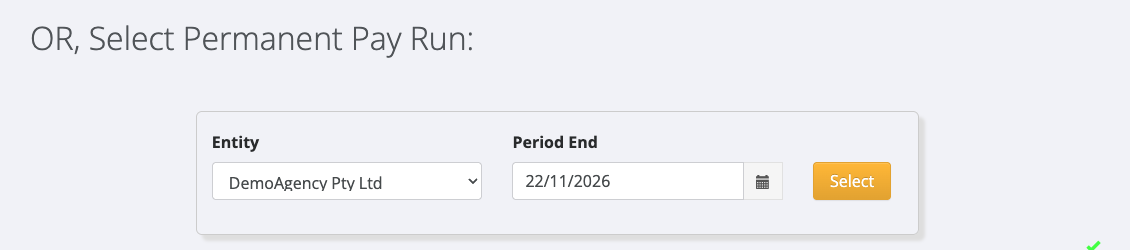
| OR, Select Permanent Pay Run | Entity and Period End | Choosing who to pay and for which period |
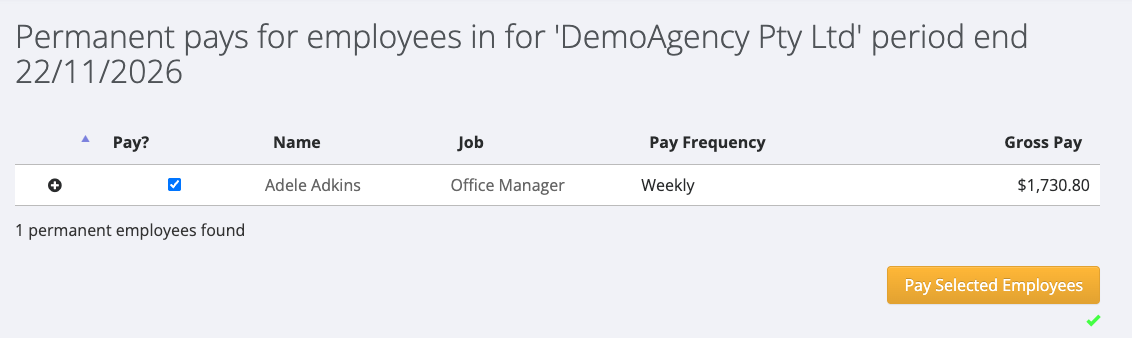
| Pay? | A tick box for each employee | Choosing which employees to pay |
| Job | The job title from the employee's salary | Checking the right salary is in use |
| Pay Frequency | Weekly, Fortnightly or 4 Weeks | Checking how often the employee is paid |
| Gross Pay | The gross amount for the period | Checking the amount before paying |
| Pay Selected Employees | Creates the pays | After ticking the employees |
Run a permanent pay
- Click Pay Employee in the main menu.
- Scroll to OR, Select Permanent Pay Run.
- Choose the Entity and the Period End date, then click Select.
- The list of permanent employees for that entity and period opens. Check each employee's Job and Gross Pay.
- Tick Pay? for each employee you want to pay.
- Click Pay Selected Employees. The message "Successfully paid employees" confirms the pays were created.
- Go to Payroll > Open Batches. The pays are listed under the pay period, in each employee's permanent division.
- Process the batch. See Processing a Pay Batch.
Before you pay again
After you click Pay Selected Employees, the employee stays in the list until their batch has been processed. Before paying the same period again, check Payroll > Open Batches to see whether a pay for that period is already waiting.
If something looks wrong
- Gross Pay is $0.00. The employee has no Daily Average Hours. See Setting a Salary for a Permanent Employee.
- "No permanent employees found", or an employee is not in the list. See Why an Employee Is Missing from a Permanent Pay.
- A red message appears on an employee's row. The message says what is wrong. See Why an Employee Is Missing from a Permanent Pay for each message.
In New Zealand
- The list of permanent employees also has an Add leave for all button.