In a nutshell: Go to Employees > Add Employee, fill in the panels and click Add. In New Zealand the form asks for the employee's IRD number, tax code, and how their annual leave is handled.
Applies to: New Zealand. For Australia, see Adding an Employee.
About
An employee's record holds everything needed to pay them: who they are, how they are taxed, how their leave works and which bank account their pay goes to.
You can enter all of it yourself, or send the new starter an invitation to enter their own details. See Onboarding a New Employee or Contractor.
Quick Reference
| Panel | What it holds |
|---|---|
| Personal Details | First Name, Last Name, Other Name, Title, Gender, Date of Birth |
| Contact Details | Address, Country, Mobile, Landline and Email |
| System Settings | Start Date, Annual Leave Payout, Anniversary Date, Pay Frequency, Employee Type, Default Division, Leave Location |
| Custom Fields | Any extra fields set up for your organisation |
| Tax | Tax Code and IRD Number |
| Bank Details | The account or accounts the pay goes to |
| Additional Student Loan Repayments | Extra student loan deductions |
| Work Entitlement | The employee's right to work |
Add an employee
- Go to Employees > Add Employee. Add Employee opens.
- Fill in Personal Details: First Name, Last Name, Gender and Date of Birth are required.
- Fill in Contact Details: Address, Country and Email are required. Payslips are sent to this email address.
- Fill in System Settings. See the next two sections for the leave and employee type choices.
- Fill in Tax: choose the Tax Code and enter the IRD Number.
- Fill in Bank Details.
- Click Add.
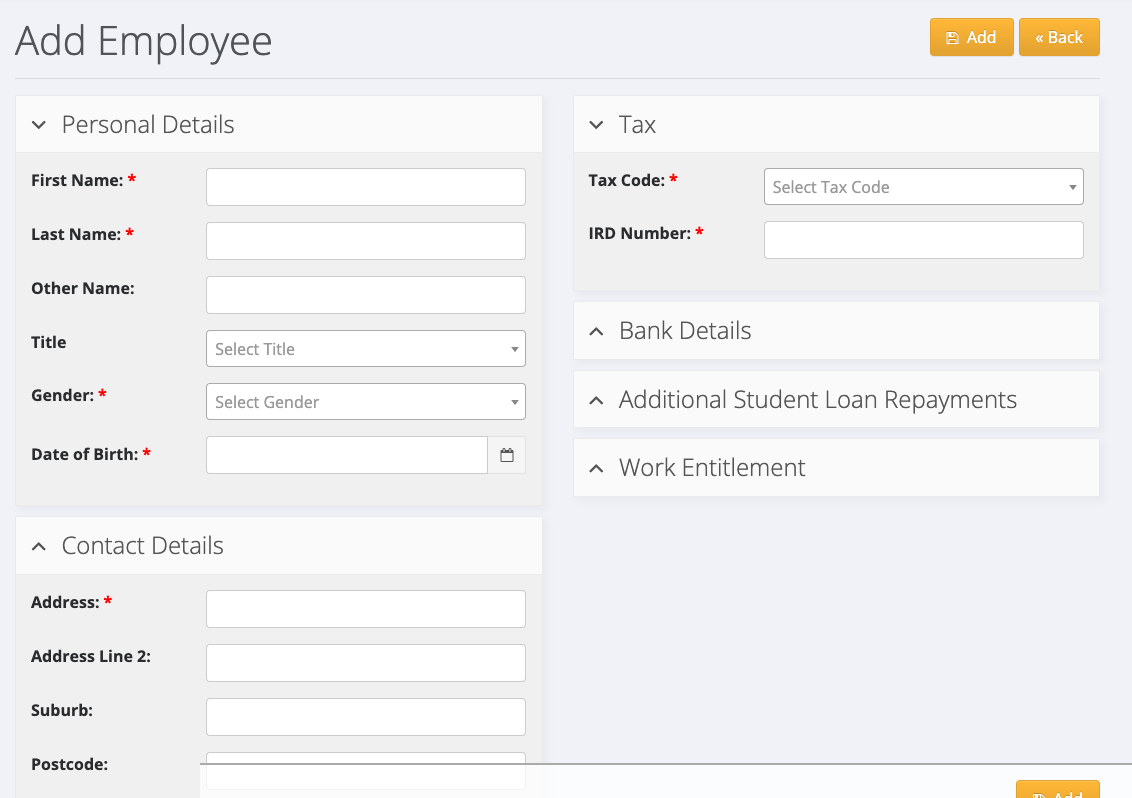
Click a panel's heading to open or close it. Fields marked with a red star are required.
How annual leave is handled
Annual Leave Payout has two choices:
- Accrue leave 12 months from last anniversary date: the employee builds up annual leave and takes it as time off.
- Payout leave at 8% of each pay on payslip: the employee is paid 8% holiday pay with each pay and does not build up annual leave.
Anniversary Date is the date the employee's leave year runs from. It is required. An employee who accrues leave needs it set so their annual leave is added each year.
You can change the choice later from the employee's record, using the leave button at the top.
Employee type and pay frequency
- Employee Type is Casual or Permanent.
- Pay Frequency is Weekly, Fortnightly or 4 Weeks.
- Leave Location is the client location leave is recorded against for a permanent employee.
Tax codes
Choose the code the employee gave you on their tax code declaration: M, M SL, ME, ME SL, S, S SL, SH, SH SL, ST, ST SL, SA, SA SL, SB, SB SL, ND, WT or STC.
Use ND when the employee has not given you an IRD number or tax code declaration. A pay batch will not process for an employee without a valid IRD number unless their tax code is ND.
Change an employee later
Open the employee from Employees > Search, click Edit Employee, make the change and click Apply Changes.